Knowledge Base
Categories: Crazy Domains Account
Set Up Preferred Payment Method for Affiliate Payout
This guide explains how to set up your preferred payment method for affiliate payouts in the Crazy Domains Affiliate Program. By the end, you’ll know how to update your payout details, select a payout schedule, and avoid delays in receiving your commissions.
How To Set Up Your Preferred Payment Method
Follow these steps to update your affiliate payout method:
- Log in to your affiliate account.
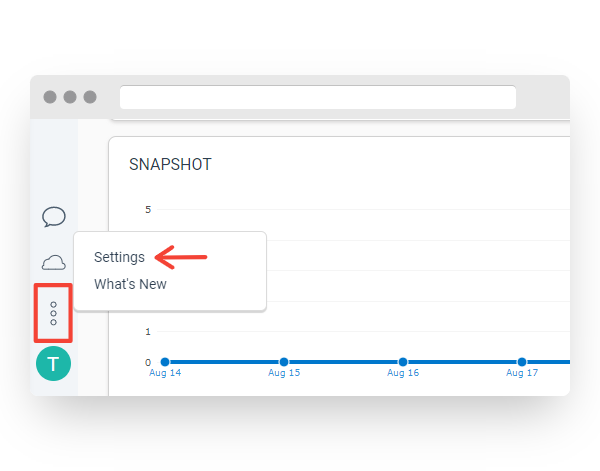
- In the lower-left section of the affiliate dashboard, click the three‑dot icon and select Settings.
- Scroll down to the FINANCE section, and then click Bank Account.
- Under the Payment Method section of Bank Account, enter your bank account details.
IMPORTANT
- The Electronic Funds Transfer (EFT) is selected by default
- You may also choose PayPal, depending on your country
- Use English characters only when entering your bank details to avoid payout issues
Failure to follow the appropriate directions may result in your payments not being processed.
- In the Autopay section, choose how you want to receive your payouts:
- Pay me when my balance reaches threshold — Select the applicable amount threshold for your account balance.
- Pay me on a fixed day of the month — Select either the 1st or 15th of each month to withdraw your funds.
- Now, click Save to apply the changes.
You’re all set!
Your preferred payment method is now configured. Your affiliate commissions will be paid out based on your selected payout option.
Did you find this article helpful?